-

-
closeSearch
- News
- CharactersListTagsExtrasBoosted Drop ItemsComparisonEXP LVLskeyboard_arrow_rightkeyboard_arrow_down
- StoryMainEventsStatus IconsPlayer Viewskeyboard_arrow_rightkeyboard_arrow_down
- SummonsCrystalsTicketsSuggestion Utilitykeyboard_arrow_rightkeyboard_arrow_down
- Missions
- ItemsEquipmentJob RequestsMedalsSoulsTitlesTrainingZ Powerskeyboard_arrow_rightkeyboard_arrow_down
- Exchange Shop
- Training Grounds
- Z Levels
- Help
- Tournaments
- ResourcesGamePress LegendsOfficial Sitekeyboard_arrow_rightkeyboard_arrow_down
-
Settings
keyboard_arrow_rightkeyboard_arrow_downReset Language
News
About Equipment
08/26/2026 12:30 AM (CDT)
~
12/31/2029 09:00 AM (CST)
Equipment are items with Abilities that you equip to characters to enhance their stats and more. There are two main ways you can obtain Equipment: 1. Clear battles that have Equipment rewards. 2. Trade exchange items for Equipment. 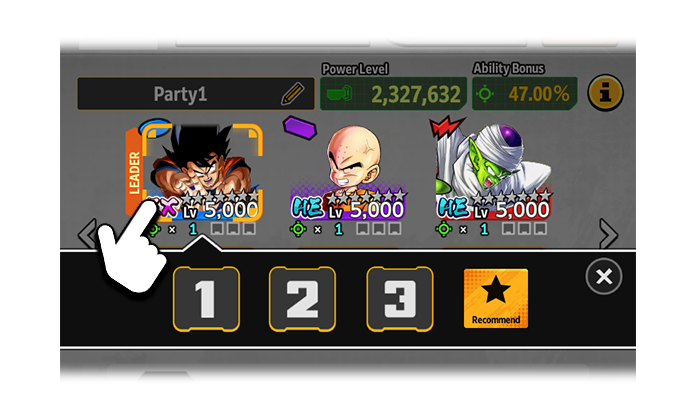 Tap the icon of the character in your party whose Equipment you want to change.
 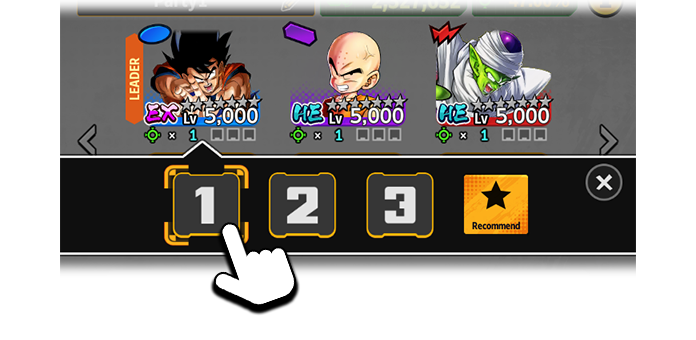 Next, tap the slot you want to put the Equipment in.
 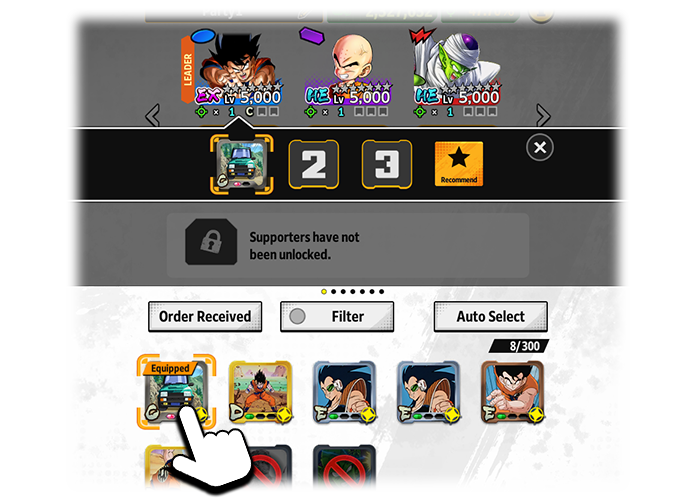 Once you've selected an Equipment slot, tap a piece of Equipment to place it there. Please note that the following Equipment cannot be equipped.
  Equip conditions must be met before a piece of Equipment can be used. Tap and hold the Equipment's icon to check its requirements. Starting from the top, the requirements are: Element/Character Tags and Limit Break level. Your character must meet all requirements before they can use the Equipment.
  There are 6 Equipment rarities. In order from lowest to highest rarity, they are: Iron, Bronze, Silver, Gold, Unique, and Platinum.
  The slots at the bottom of the Equipment show to what extent slots have been unlocked. The weakest Ability effects are green, while the strongest are red. The color of these slots is a good factor to consider when selecting your Equipment. The lowest rank is F, and the highest rank is "神" (Godly). Ranks are determined by the total strength of the abilities in each slot. Slots are unlocked through Equipment upgrades. When a slot is unlocked, it will gain an Ability, the strength of which is selected from a predetermined range. The Equipment's rank will then be updated to reflect the strength of the new Ability. Since the true strength of your Equipment is only revealed after they've been fully upgraded, aim to power them up and create some ultimate pieces of Equipment!
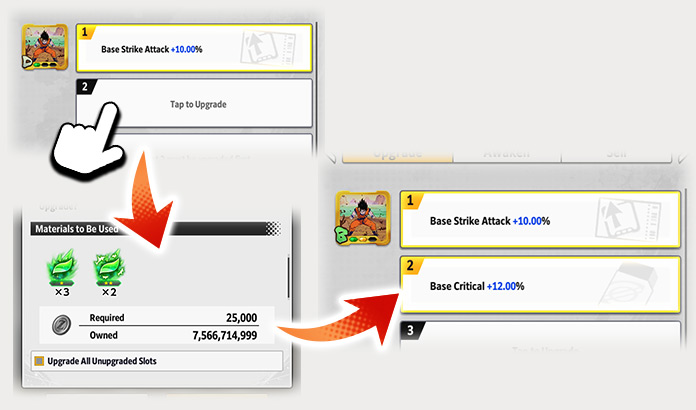 From Home, go to "Characters" and then "Equip". From the "Upgrade" tab, select an Equipment, then tap a locked slot. By upgrading the Equipment from the dialog box that opens, locked slots can be unlocked, further strengthening your character.
  Upgrading with "Upgrade All Unupgraded Slots" checked will allow you to upgrade all slots that are not yet upgraded.
  You can use items to reupgrade the Abilities in Slot 2 and Slot 3. Slot 1 cannot be normally reupgraded, but guaranteed upgrade is available. *Some Equipment are exceptions and cannot be reupgraded.
 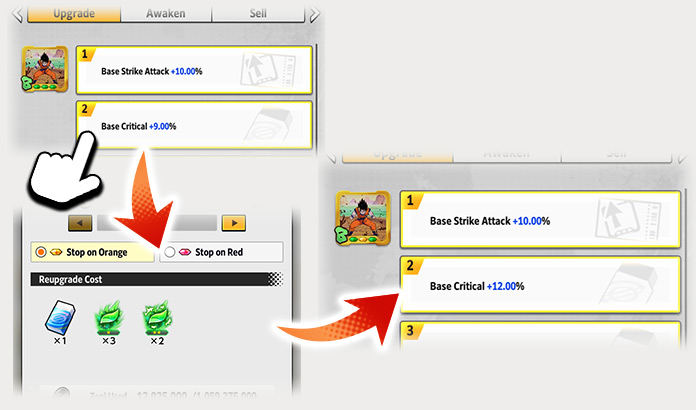 From Home, go to "Characters" and then "Equip". From the "Upgrade" tab, select an Equipment, then tap an unlocked slot. From the "Reupgrade" tab of the dialog box that opens, you can reupgrade an ability by using Slot Removers, Souls, and Zeni.
  It is possible to perform consecutive reupgrades. You will need the appropriate number of items for the number of times (1-30) you want to reupgrade. Consecutive reupgrades will stop when any of the following occur:
  If your Abilities aren't as effective as you'd like, try reupgrading them and aiming for higher-level Abilities!
  Checking "Batch Process" will skip the reupgrade animations and display the final results. When "Batch Process" is checked, your consecutive reupgrades will stop when any of the following occur:
 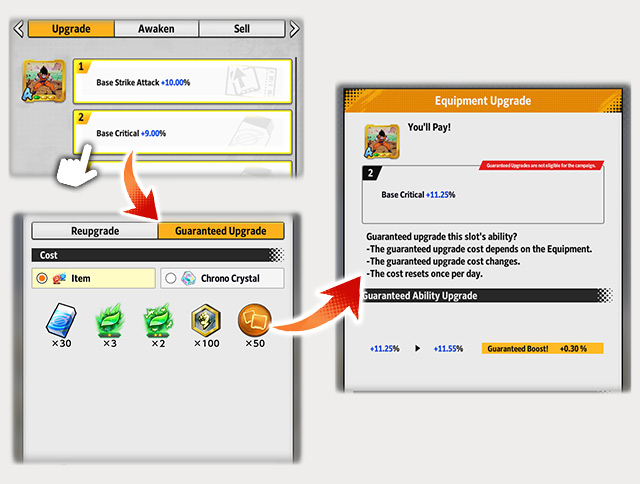 From Home, go to "Characters" and then "Equip". From the "Upgrade" tab, select an Equipment, then tap an unlocked slot. From the "Guaranteed Upgrade" tab of the dialog box that opens, you can guarantee upgrade an ability by using one of the following sets of items. 1. Chrono Crystals, Souls, and Zeni. 2. Slot Removers, Souls, Rare Medals, Equipment Medals, and Zeni.
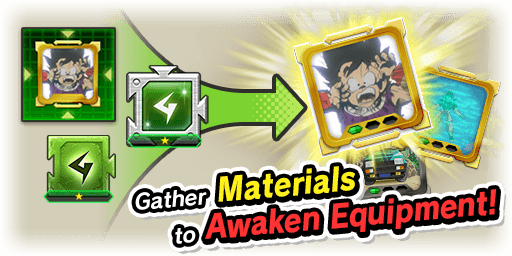 Awakened Equipment is a powerful type of Equipment you can create using materials obtained in the ZENKAI Ultra Space-Time Rush and some other Events. Although Abilities for Awakened Equipment will be powered up, equip conditions may become stricter, and there may be restrictions on using Awakened Equipment in certain game modes.
 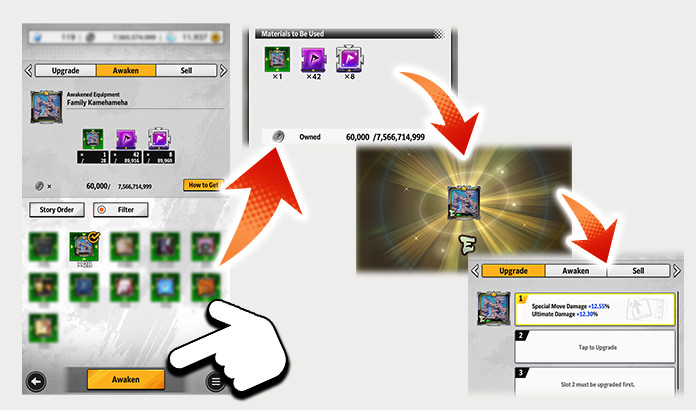 Awakened Equipment can be created by going to Home, then tapping "Characters", "Equipment", and then the "Awaken" tab.
 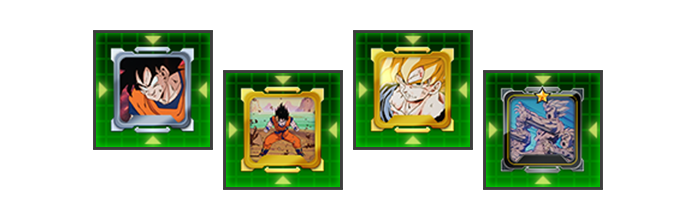 Memories are one of the material items you need to awaken Equipment. They are mainly acquired in exchange for Rush Medals.
 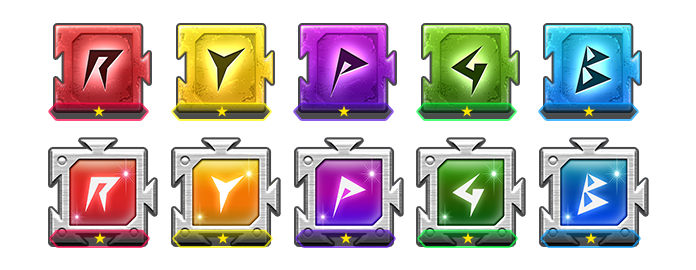 Fragments are another material item you need to awaken Equipment. Fragments have different colors and come in two types: Fragments and Rare Fragments. They are mainly acquired in exchange for Rush Medals.
  Once you have the required material items, you can use them in combination with Zeni to create Awakened Equipment. Use these tips to upgrade and create powerful Equipment!
 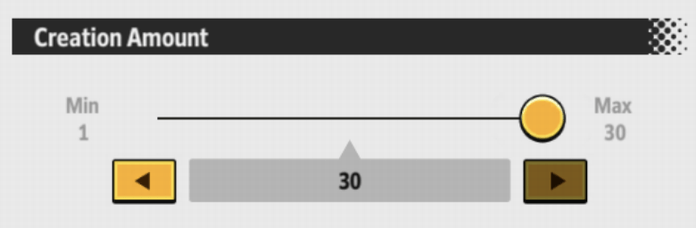 It is possible to create Awakened Equipment consecutively. You will need the appropriate number of items for the number of Awakened Equipment (1-30) you want to create. When creating Awakened Equipment consecutively, the process will stop when any of the following occur:
 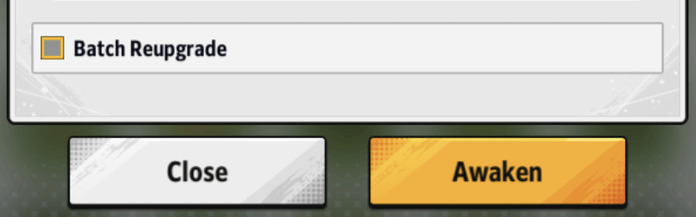 Checking "Batch Process" will skip the animations and display the final results. When "Batch Process" is checked, your consecutive Equipment awakening will stop when any of the following occur:
 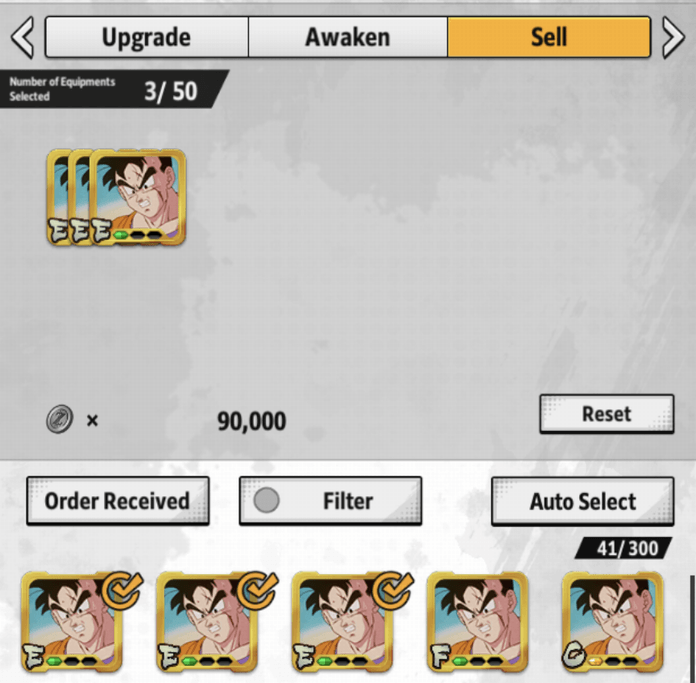 Equipment you no longer need can be sold from the Sell tab in Home > Characters > Equip.
  You can increase the amount of Equipment you can hold by obtaining the "Expand Equipment Limit" item from the Exchange Shop in the Menu or by purchasing it from the Shop as part of a set. Subscribing to the monthly subscription service "LEGENDS Pass" also lets you use special LEGENDS Pass expanded slots separate from your standard slots. *When your LEGENDS Pass period ends, any Equipment in the special expanded slots must either be moved to your standard slots or sold. *Affected Equipment that is equipped to characters at that time will be automatically unequipped. *If your inventory is full, you can sell Equipment from the standard slots, and move Equipment in the expanded slots back to standard slots.
 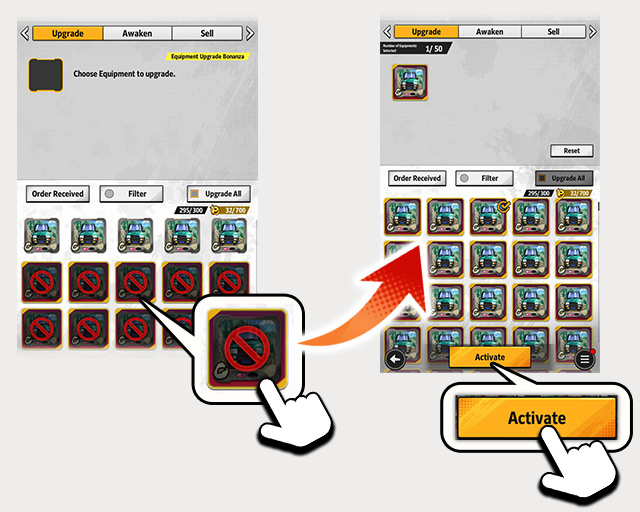 To move Equipment to standard slots, tap the Activate button on the Equipment screen and select the Equipment you want to move. *If you have canceled your Legends Pass, the Activate button will appear when you tap Equipment in an expanded slot on the Equipment Upgrade screen. We hope you continue to enjoy Dragon Ball Legends. Dragon Ball Legends Management Team
How to Select Equipment
When a character uses Equipment, they will gain its effects. To select Equipment, go to Home > Characters > Party Formation. 1. Select a Character
Tap the icon of the character in your party whose Equipment you want to change. 2. Select an Equipment Slot
Next, tap the slot you want to put the Equipment in. 3. Select Your Equipment
Once you've selected an Equipment slot, tap a piece of Equipment to place it there. Please note that the following Equipment cannot be equipped. - Equipment with conditions they do not meet.
- More than one piece of Equipment with the same name.
*Some Equipment, like "There's no way that WE...could lose to someone like you!", allows for one character to equip multiple pieces with the same name.
Equip Conditions
Equip conditions must be met before a piece of Equipment can be used. Tap and hold the Equipment's icon to check its requirements. Starting from the top, the requirements are: Element/Character Tags and Limit Break level. Your character must meet all requirements before they can use the Equipment. In-Depth Equipment Info
Rarity, rank, and slots all affect an Equipment's Abilities. Understanding these three aspects will help you create the ultimate piece of Equipment! Equipment Rarity
There are 6 Equipment rarities. In order from lowest to highest rarity, they are: Iron, Bronze, Silver, Gold, Unique, and Platinum. Equipment Slots & Ranks
The slots at the bottom of the Equipment show to what extent slots have been unlocked. The weakest Ability effects are green, while the strongest are red. The color of these slots is a good factor to consider when selecting your Equipment. The lowest rank is F, and the highest rank is "神" (Godly). Ranks are determined by the total strength of the abilities in each slot. Slots are unlocked through Equipment upgrades. When a slot is unlocked, it will gain an Ability, the strength of which is selected from a predetermined range. The Equipment's rank will then be updated to reflect the strength of the new Ability. Since the true strength of your Equipment is only revealed after they've been fully upgraded, aim to power them up and create some ultimate pieces of Equipment! Upgrading Equipment
From Home, go to "Characters" and then "Equip". From the "Upgrade" tab, select an Equipment, then tap a locked slot. By upgrading the Equipment from the dialog box that opens, locked slots can be unlocked, further strengthening your character. Equipment effects cannot be cancelled by "Cancels Attribute Upgrades" or similar abilities.
*Any exceptions will have their conditions listed.
*Platinum Equipment cannot be upgraded because the slot values are fixed.
Reupgrading Slots
You can use items to reupgrade the Abilities in Slot 2 and Slot 3. Slot 1 cannot be normally reupgraded, but guaranteed upgrade is available. *Some Equipment are exceptions and cannot be reupgraded. From Home, go to "Characters" and then "Equip". From the "Upgrade" tab, select an Equipment, then tap an unlocked slot. From the "Reupgrade" tab of the dialog box that opens, you can reupgrade an ability by using Slot Removers, Souls, and Zeni. *The reupgrade cost depends on how many times Abilities have been reupgraded on that piece of Equipment.
*The cost resets once per day.
*You cannot revert to a previous Ability after reupgrading.
*Similar to unlocking slots, reupgrading will give the Equipment an Ability, the strength of which is selected from a predetermined range.
- 1. Depending on the selected stop condition, an orange (or higher) or red Ability is reached.
- 2. The selected number of consecutive reupgrades is reached.
- 3. The "Stop" button is tapped.
If your Abilities aren't as effective as you'd like, try reupgrading them and aiming for higher-level Abilities! - 1. Depending on the selected stop condition, an orange (or higher) or red Ability is reached. *If reupgrading stops partway through, the remaining costs will be refunded.
- 2. The selected number of consecutive reupgrades is reached.
*When "Batch Process" is checked, the "Stop" button cannot be used to stop the reupgrades early.
Guaranteed Upgrade
Guaranteed upgrades will always increase the ability effects of the selected slot. *How much stronger a given ability will become with guaranteed upgrade depends on the Equipment. *A guaranteed upgrade will never cause an Ability effect to exceed its maximum value. *The Abilities themselves will not be changed. *You cannot guaranteed upgrade Equipment slots for Abilities that change effects when boosted, or Abilities that have negative effects. For example, guaranteed upgrade cannot be used for "I have the power to destroy you now!" Slot 3, "There's no way that WE...could lose to someone like you!", "Sacred Water", or "Rraaaaaagh!". From Home, go to "Characters" and then "Equip". From the "Upgrade" tab, select an Equipment, then tap an unlocked slot. From the "Guaranteed Upgrade" tab of the dialog box that opens, you can guarantee upgrade an ability by using one of the following sets of items. 1. Chrono Crystals, Souls, and Zeni. 2. Slot Removers, Souls, Rare Medals, Equipment Medals, and Zeni. Performing guaranteed upgrades on Slot 1 will consume Guaranteed Upgrade Tickets [Slot 1]. The amount of tickets required varies depending on factors like the Equipment's rarity and whether it is awakened or not. Guaranteed Upgrade Tickets [Slot 1] can be purchased at the Shop.
*The guaranteed upgrade cost depends on the Equipment.
*The guaranteed upgrade cost changes.
*The cost resets once per day.
Use guaranteed upgrade to aim for the ultimate Equipment! Awaken Your Equipment!
Awakened Equipment is a powerful type of Equipment you can create using materials obtained in the ZENKAI Ultra Space-Time Rush and some other Events. Although Abilities for Awakened Equipment will be powered up, equip conditions may become stricter, and there may be restrictions on using Awakened Equipment in certain game modes. *As in the examples below, Awakened Equipment cannot be used with normal Equipment of the same name.
・"You'll Pay!" and "[Awakened] You'll Pay!"
・"Angry Super Saiyan!" and "[Awakened] Angry Super Saiyan!"
How to Create Awakened Equipment
Awakened Equipment can be created by going to Home, then tapping "Characters", "Equipment", and then the "Awaken" tab. *Equipment Awakening is unlocked after you clear Main Story Part 1 Book 2 Chapter 5 on NORMAL difficulty.
1. Acquire Memories
Memories are one of the material items you need to awaken Equipment. They are mainly acquired in exchange for Rush Medals. 2. Acquire Fragments
Fragments are another material item you need to awaken Equipment. Fragments have different colors and come in two types: Fragments and Rare Fragments. They are mainly acquired in exchange for Rush Medals. 3. Create the Awakened Equipment
Once you have the required material items, you can use them in combination with Zeni to create Awakened Equipment. Use these tips to upgrade and create powerful Equipment! *When awakening Equipment, the first slot will be unlocked with an ability effect chosen at random.
- 1. Depending on the selected stop condition, an orange (or higher) or red ability is reached.
- 2. The selected number of Awakened Equipment has been created.
- 3. The "Stop" button is tapped.
- 1. Depending on the selected stop condition, an orange (or higher) or red ability is reached. *If reupgrading stops partway through, the remaining costs will be refunded.
- 2. The selected number of Awakened Equipment has been created.
*When "Batch Process" is checked, the "Stop" button cannot be used to stop Equipment awakening early.
Selling Equipment
Equipment you no longer need can be sold from the Sell tab in Home > Characters > Equip. *Different Equipment will fetch different prices.
Expanding Equipment Limits
You can increase the amount of Equipment you can hold by obtaining the "Expand Equipment Limit" item from the Exchange Shop in the Menu or by purchasing it from the Shop as part of a set. Subscribing to the monthly subscription service "LEGENDS Pass" also lets you use special LEGENDS Pass expanded slots separate from your standard slots. *When your LEGENDS Pass period ends, any Equipment in the special expanded slots must either be moved to your standard slots or sold. *Affected Equipment that is equipped to characters at that time will be automatically unequipped. *If your inventory is full, you can sell Equipment from the standard slots, and move Equipment in the expanded slots back to standard slots.